


U9PLAY Registration on downloadu9play.com
Register to U9PLAY Safely on downloadu9play.com
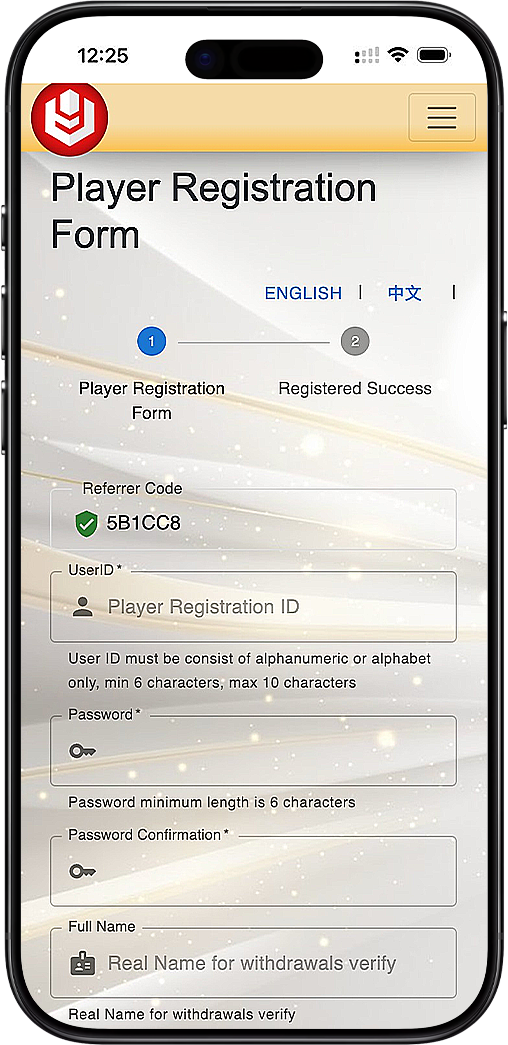
Welcome to the U9PLAY register page on downloadu9play.com. This registration form helps you create a U9Play account in a few minutes. You’ll only need to choose a User ID, set a password, enter your real name for withdrawals verification, and confirm your mobile number using OTP. Once verified, you can complete your registration and get started with U9Play.
About the Registration Steps on downloadu9play.com
Step 1: Enter Your Referrer Code (If Provided)
If you received a referrer code from an agent or friend, confirm that it appears correctly on the register page. This code helps link your registration to the right referral source on downloadu9play.com.
Step 2: Create Your User ID and Password
Choose a User ID that is easy to remember and follows the requirements: alphanumeric letters only, minimum 6 characters, maximum 10 characters. Then create a strong password (minimum 6 characters) and confirm it to secure your U9PLAY account on downloadu9play.com.
Step 3: Add Your Full Name for Withdrawals Verification
Enter your real full name exactly as it appears on your identification documents. This is required for withdrawal verification and helps keep your U9Play account safe and compliant.
Step 4: Select Currency and Country Details
Select your preferred currency (for example, MYR) and choose your country (such as Malaysia). The phone prefix will update automatically to match your country selection, helping ensure your OTP verification works correctly.
Step 5: Verify Your Mobile Number with OTP
Choose your preferred OTP method for verification. Options may include OTPq (App), WhatsApp OTP, SMS OTP, or sending OTP through your operator. After requesting OTP, you will receive a code and can enter it to confirm your number for your U9PLAY account on downloadu9play.com.
Step 6: Complete Registration
After entering the correct OTP code, submit the form to complete your U9Play registration. Once successful, you'll be ready to explore your account features and proceed with your U9Play journey.
OTPq App Guide for Fast Verification on downloadu9play.com
If you select OTPq (App) as your verification method, download and install the OTPq app from your device store (Android, Huawei, or Apple). Next, verify your registered phone number inside the OTPq app (via WhatsApp). After verification is successful, return to downloadu9play.com, request OTP, and enter the OTP you receive in the app to finish your U9PLAY registration smoothly.
Tips for a Smooth U9PLAY Registration on downloadu9play.com
To register successfully on downloadu9play.com, ensure your phone number is active and able to receive OTP messages, double-check your User ID format, and use a secure password. If your OTP expires, re-request a new code using your selected method. For the best experience, keep your device time and network stable during verification.
Register to U9PLAY Now
Create your U9Play account on downloadu9play.com in minutes—enter your details, verify with OTP, and complete registration to get started.
Register Now - Malaysia Register Now - Singapore